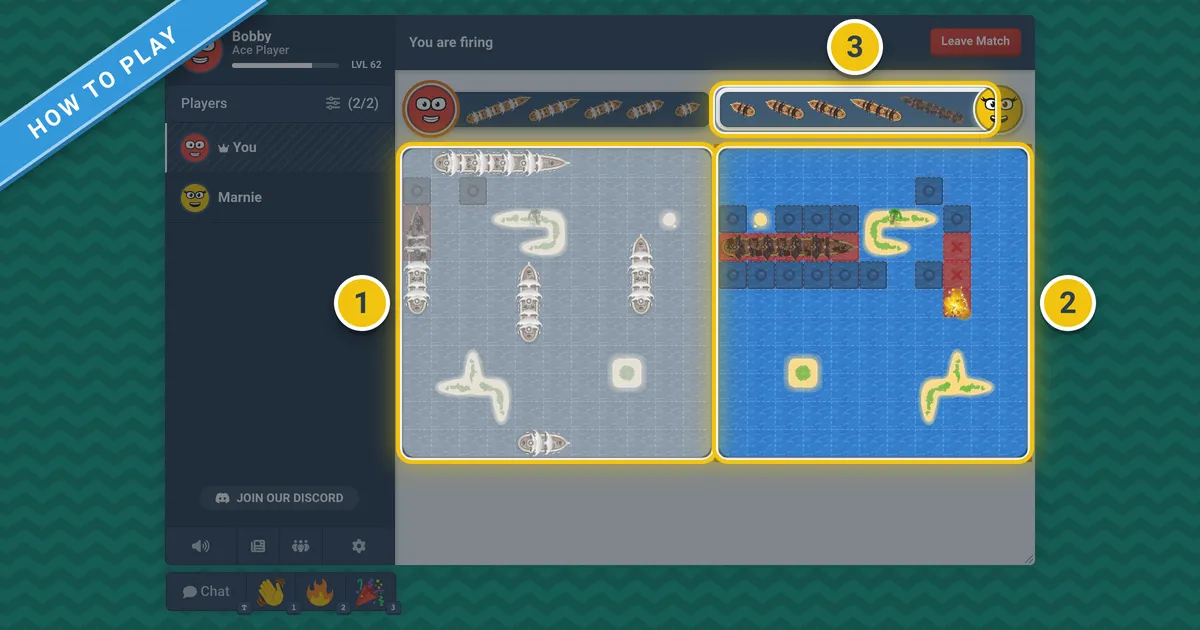
Battleship is a guessing game for two players. Both of you secretly hide a fleet of ships on a grid, and then you take turns firing at squares on each other's grids. Your opponent lets you know whether you've hit or missed. The first player to sink all the ships in the other player's fleet wins.
Battleship is easy to learn, and the fastest way to figure out the rules is to just play a game. You can play Battleship free on Bloob.io with a friend or a bot. No account needed, no download.

What you need
- Two players
- Two grids for each player: one for your ships, and one to keep track of your shots
- Five ships each
The boxed version of Battleship by Hasbro has a 10x10 grid. Rows are lettered A to J and columns are numbered 1 to 10, which gives each square a name, like B7 or J10. You can play with pen and paper by drawing the same grids.
The fleet
Each player has the same five ships. Each ship is a straight line of squares.
| Ship | Squares |
|---|---|
| Carrier | 5 |
| Battleship | 4 |
| Cruiser | 3 |
| Submarine | 3 |
| Destroyer | 2 |
That's a total of 17 squares of ships, out of 100 on the grid.
Placing your ships
Both players place their ships on their own grid before the first shot is fired. Keep your grid hidden.
- Place each ship in a straight line, either across or up and down. No diagonals.
- Ships can't overlap, and all squares of a ship must be on the grid.
- No moving ships after the game starts.
In the official rules, ships are allowed to touch each other. Many players use a house rule that doesn't allow touching (see the variations below).
How a turn works
- Call a shot. Name a square on your opponent's grid, for example "C5".
- Your opponent responds. They say "hit" if there's a ship on that square, or "miss" if there's just water.
- Record it. Mark the square on your tracking grid, with one mark for a hit and another for a miss. Your opponent marks the hit on the ship on their own grid.
- Sunk. When all squares of a ship have been hit, the owner says which ship it was: "You sank my battleship!"
- Turn over. In the classic rules, you get one shot per turn, whether it's a hit or a miss.
For example, you fire at E4. "Hit." On your next turn, you fire at E5. "Miss." Then E3: "Hit." Then E2: "Hit. You sank my cruiser!" Now you know the cruiser was on E2, E3 and E4, and you're back to hunting for the other four ships.
Winning the game
The first player to sink all five of the other player's ships wins. In the classic game, that means hitting all 17 squares of their fleet.
Strategy tips
Battleship takes more skill than you'd think. Good players find ships with fewer shots.
- Use a checkerboard pattern. Imagine the grid is colored like a checkerboard, and only fire at one color as you search. The smallest ship is two squares in a row, so it will always be on one square of each color. That means you can find every ship by firing at only 50 of the 100 squares.
- Widen your search after the small ships are sunk. Once the destroyer is sunk, the smallest ship left is three squares long. Now you only have to fire at every third square in each row (shift the pattern by one each row) to make sure you find the rest.
- Hunt after a hit. If you get a hit, the rest of the ship is next to it. Fire at the four squares around it (up, down, left, right). Once you get another hit, you'll know which direction the ship lies. Keep firing in that direction until you sink it, and if that direction runs into a miss, try the other end.
- Use what you know. If the only ships left are four and five squares long, there's no way one is hiding in a pocket of open water only three squares long or wide. Skip it.
- Don't make a pattern with your ships. Players often spread their ships out evenly or put them on the edges. Vary this from game to game. Don't put all your ships in a corner, but don't always keep them apart either.
- Keep track. Keep good notes. If you fire at a square you've already fired at, you're wasting a turn.
Common variations
- Salvo. You get several shots each turn instead of just one. In one common version, you get one shot for each of your ships still afloat, so if you lose ships, you lose firepower too.
- Shoot again after a hit. Some groups let you shoot again each time you hit. This speeds up the game and makes it swingier.
- No touching. Ships can't touch each other, not even at the corners. This is the rule in the Russian version, Sea Battle, which also has a different fleet: one ship of 4, two of 3, three of 2 and four of 1.
- Name the ship on every hit. Some players say "hit, submarine" instead of just "hit". This makes it easier for the shooter.
Battleship on Bloob.io
Battleship on Bloob.io is always one player against another, or against a bot. The fleet is the classic one, with ships of 5, 4, 3, 3 and 2 squares. But the board is different:
- The board is 11x11, not 10x10.
- Most maps have islands. You can't put a ship on land, and you can't fire at land. There are 11 maps (Peninsula, Archipelago, Canal, Atoll, Bay, Big Island, Little Island, The Keys, Lagoon, Pier and Ocean). Ocean is open water with no land. By default, a random map is chosen for each match.
- There's a timer for placing ships. You have 45 seconds to drag your ships into place. You can rotate a ship with the R key, or by tapping it on a phone. A button places your ships at random, and any ships you haven't placed when the timer runs out are placed for you.
- There's a timer on each turn. You have 15 seconds to fire. If the timer runs out, a shot is fired for you.
When you play against the computer, there are no timers.
Some of the variations above are on by default:
- Ship Spacing is on. Ships can't touch, not even at the corners. With Ship Spacing: Auto Mark, when you sink a ship, all the squares around it are marked for you, since nothing else can be there.
- Hit After Hit is on. You get to shoot again after each hit, and your turn ends on a miss.
- Ship Reveal is on. When you sink a ship, you see exactly which ship it was and where it was.
All of these can be changed in the lobby settings. You can turn off Ship Spacing, Auto Mark or Hit After Hit. You can set Ship Reveal to only show how many ships are left, or turn it off so you have to keep track yourself. You can also change the Map, its Orientation (which way it faces), the Placement Time (5 to 180 seconds) and the Turn Time (5 to 60 seconds). The Time Freedom preset turns off the timers, so the match waits until both players are ready.
To play as close to the classic rules as possible, use the Ocean map and turn off Ship Spacing and Hit After Hit. The only difference left is the 11x11 board.
Can ships touch in Battleship?
Yes, in the official rules from Hasbro. Ships can be next to each other, as long as they don't overlap. Many players have a house rule that doesn't allow touching. On Bloob.io, ships can't touch by default, and you can turn that off in the lobby with Ship Spacing.
Do you get another turn after a hit in Battleship?
Not in the classic rules. You get one shot per turn, whether it's a hit or a miss. Shooting again after a hit is a popular house rule, and on Bloob.io it's on by default (Hit After Hit).
Can you play Battleship online with friends?
Yes. You can play Battleship on Bloob.io for free with a friend or against a bot. No account needed, no download. It runs in your browser.